


LarlyPix AI-AI Flower world
0.00.00 Reviews
App Specs
- Version
- 1.0.4
- Updated On
- License
- Free
- Downloads
- 10,000+
- Developer
- Reverie Quest Visionaries
- Categories
- Art & Design
- Platform
- Android
Screenshots

 Analysis by AppCompare
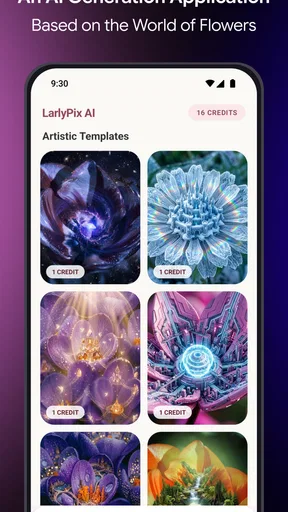
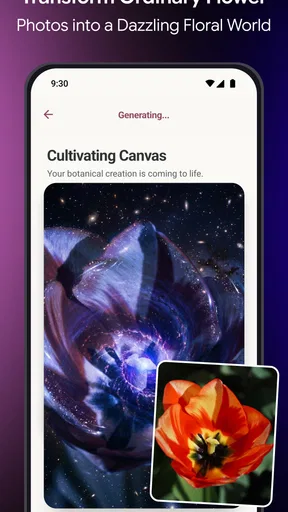
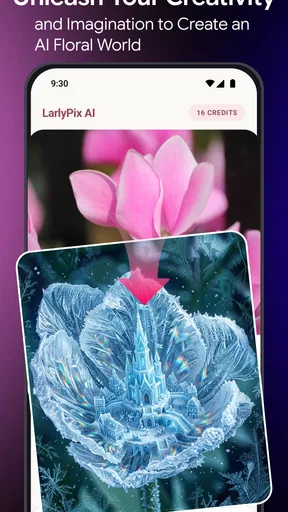
If you’re trying LarlyPix AI for the first time, the clearest reason to open it is to turn a flower photo into an artistic image. That makes it more focused than a general photo editor: the appeal is not a large toolbox for every kind of picture, but a floral starting point for creative experiments. I’d approach it as a playful art app rather than a dependable botanical reference or a full design studio.
The app is free to download, is rated Everyone, and is developed by Reverie Quest Visionaries. It sits in the art and design category, with 10K+ installs and a current version of 1.0.4. Its average rating is 0.0, so I wouldn’t use ratings as a shortcut for judging whether its style suits me. Instead, I’d try it with a photo I already like and see whether the result feels worth keeping.
Exploring the Petal-Packed Features
The first thing you notice about LarlyPix AI is its intuitive interface. It's designed to be user-friendly, making it accessible for everyone, from tech newbies to seasoned app enthusiasts. Upon launching the app, you're greeted with a colorful display of flower species, each more stunning than the last. The AI-driven algorithms behind this app are nothing short of impressive, allowing it to recognize and generate a breathtaking variety of floral images.
One of the standout features is the "Floral Fusion" tool. This nifty function lets you combine different flower types to create unique hybrids. I spent hours mixing and matching roses with lilies and daisies with tulips, and the results were always surprisingly beautiful. It’s like having a personal digital greenhouse, minus the watering duties.
For a first attempt, I’d keep the source image simple: one clearly visible bloom, a reasonably uncluttered background, and enough light to show the petals’ shape. That gives the transformation a stronger visual anchor than a crowded bouquet or a flower partly hidden by leaves. It’s also a useful way to tell whether the app is responding to the subject you care about or producing an effect that overwhelms it.
A practical everyday use is turning a quick garden or market photo into a small piece of shareable art. I might take a picture while walking, try a floral treatment later, then save the version that feels most like my own taste. For a card or a personal post, that can be more satisfying than choosing a generic flower graphic. I’d keep the original photo too, so I can compare the artwork with the real bloom and avoid losing the details that made me take the picture.
The AI Magic Behind the Scenes
What really sets LarlyPix AI apart from other floral apps is its use of machine learning. The AI doesn’t just randomly generate flower images; it learns from your preferences. The more you use the app, the more it tailors its suggestions to your tastes. It’s a bit like having a floral designer tucked away in your phone, ready to whip up stunning arrangements at a moment’s notice.
Worth Reading Before You Choose

Flipboard Shows What News Apps Must Do Beyond the Feed

Switching to Android Auto Means Rethinking Your Driving Routine

Google Calendar Makes a Crowded Week Easier to Manage

Ludo King Makes the Most of the Minutes Between Plans

Baby Panda World Brings Quick Play to Modern Phones, but Its Game Library Feels Busy

ESPN’s Live Game View Makes Following Close Games Easier
Another feature worth mentioning is the "Flower ID" option. Ever been on a walk and wondered what that particularly striking bloom is called? Just snap a picture within the app, and the AI quickly identifies it for you. It’s incredibly accurate, transforming casual strolls into educational botany expeditions.
Even if I’m mainly interested in the art side, I’d treat identification as a prompt for curiosity rather than a final answer. A close, sharp picture of the flower is a better starting point than a distant shot where foliage and background compete for attention. If I planned to rely on a name for gardening or safety, I’d check it against a trusted reference instead of assuming an app result settles the question. That distinction matters: creative interpretation can be fun when it is loose, while identification needs more care.
The app’s stated focus on flowers is also a useful boundary when comparing it with familiar alternatives. A general-purpose editor is usually the better choice when I need precise cropping, layered layouts, or broad control over many kinds of images. A flower-focused AI app makes more sense when the subject itself is the point and I want to explore imaginative variations without building every effect manually. Neither approach replaces the other; the right choice depends on whether I’m editing a finished photograph or looking for a floral idea to develop.
Bringing Your Creations to Life
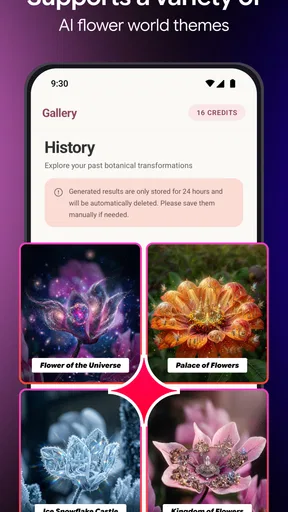
Once you've crafted your perfect flower or identified a new favorite, the app offers a range of options to showcase your creations. Whether you want to save them to your gallery, share on social media, or even print them out, LarlyPix AI makes it easy. I particularly enjoyed using the “Garden Gallery” feature, which allows you to create a digital album of your favorite flowers and arrangements.
For those looking to add a touch of personalization, the app includes customizable filters and effects. You can adjust colors, add textures, and even insert text, making each floral design uniquely yours. I found this especially useful for creating personalized greeting cards and art pieces.
My preferred workflow would be to make a few variations from one photo, then compare them side by side before adding text or extra styling. If I decorate too early, it becomes harder to judge whether the flower treatment itself works. For a greeting card, I’d also leave enough calm space around the main bloom for a short message; a busy image can look charming in a gallery but become difficult to read once lettering is added. That small order-of-operations choice saves time and makes the final image feel more deliberate.
Someone making occasional keepsakes can likely treat the free download as a low-commitment place to experiment. In-app purchases range from $5.99 to $99.99 per item, so I’d check what a particular purchase offers before spending and decide whether it solves a real need in my workflow. If I only want to try a few flower transformations, I would start without buying anything. If a paid option is presented, its value depends on how often I return to the app and whether its specific benefits matter to me.
There are trade-offs to the focused approach. A flower image can be striking while still drifting away from the actual plant’s colors or structure, so I wouldn’t use an AI-styled result as a faithful record of a bloom. And if I need exact control over typography, print dimensions, or a complex composition, a dedicated design or photo-editing app may be less limiting. LarlyPix is most appealing when experimentation matters more than strict accuracy or detailed manual adjustments.
A Blooming Success
In a world where technology often feels cold and impersonal, LarlyPix AI offers a refreshing blend of nature and innovation. It’s an app that encourages creativity, learning, and appreciation for the natural world, all while showcasing the incredible potential of artificial intelligence.
Whether you’re a flower enthusiast, a casual gardener, or simply someone who appreciates the beauty of nature, LarlyPix AI is sure to captivate you. So why not give it a go and let your imagination blossom? After all, in the world of LarlyPix AI, there’s always room to grow.
I’d recommend it to someone who enjoys making floral images for personal projects and is happy to judge results by eye. It is less suited to someone who needs dependable plant identification, exact photographic fidelity, or a broad editing suite for everyday pictures. The minimum operating system is 7.0, which is worth checking before installing, and the app is free to try, with optional in-app purchases for people who decide they want more.
My best first session would be deliberately modest: choose a clear flower photo, make one transformation, and compare the result with the original before spending time on finishing touches. If that first image gives you an idea for a card, a small gallery, or another experiment, keep going. If the artificial look is not your style, a conventional editor will probably serve you better. That makes the decision simple: this is a niche creative tool for seeing familiar flowers in a new way, not a must-have replacement for every camera or art app.
Pros
- User-friendly interface for easy navigation.
- Wide variety of flower species to explore.
- AI-generated flower identification is accurate.
- Regular updates with new flower content.
- Offline mode available for on-the-go use.
Cons
- Requires substantial storage space.
- Occasional delays in AI processing.
- Limited language support currently.
- In-app purchases can be pricey.
- Some features need internet access.
FAQs for LarlyPix AI-AI Flower world
What is LarlyPix AI-AI Flower World?
LarlyPix AI-AI Flower World is a unique app that combines artificial intelligence with the beauty of nature. It allows users to explore a virtual world filled with AI-generated flowers. The app provides an immersive experience, offering features such as flower identification, interactive gardening, and educational content about various flower species.
How does the AI feature work in LarlyPix AI-AI Flower World?
The AI in LarlyPix AI-AI Flower World analyzes images to identify flowers and provide detailed information about them. It uses machine learning algorithms to recognize patterns and offer accurate data. Additionally, the AI assists in creating custom gardens based on user preferences, enhancing the overall interactive experience.
Is LarlyPix AI-AI Flower World suitable for children?
Yes, LarlyPix AI-AI Flower World is designed to be family-friendly and suitable for children. It offers educational content about flowers and gardening, making it an excellent tool for learning. Parental controls and guided modes ensure a safe and enriching experience for younger users, promoting both fun and education.
What platforms is LarlyPix AI-AI Flower World available on?
LarlyPix AI-AI Flower World is available for both Android and iOS devices. Users can download it from the Google Play Store or the Apple App Store. The app is optimized for smartphones and tablets, ensuring a seamless experience across different devices with consistent performance and visual quality.
Are there any in-app purchases or subscriptions in LarlyPix AI-AI Flower World?
While LarlyPix AI-AI Flower World offers a range of free features, it also includes optional in-app purchases. Users can buy additional garden themes, exclusive flower species, or subscribe for premium content that enhances the app’s functionalities. These purchases are entirely optional and not necessary to enjoy the core features.


